I'm often asked if Wessex Professional will run on an Apple Mac computer. In fact a previous post on the issue has had more views than any of my other posts.
As you may gather I'm a "Windows" man, but a few months ago I bought a reconditioned MacBook to see what the fuss was about. Of course that led to some research to see about running the pricing program on it.
I downloaded the free trial of CrossOver Mac from CodeWeavers. The result - well see for yourself!
I've only had a short time to tinker with the result and there are some problems with printing, but there seems to be no major issues with the Basic version of Wessex Professional.
I certainly hope to be able to come up with a solution to the printing errors which would make the full version useable. (At the moment everything is printed into the top quarter of an A4 sheet, instead of over the whole sheet.)
It was very easy to install Wessex Professional into what CrossOver calls a "bottle" (think of it as an oasis of Windows files amid a desert of Mac!). Then I needed to add extra files (dependencies) to get the program to run (very few programs these days are completely standalone). Again CrossOver made it straightforward to find and install them. Just so you know, these files are .Net Framework 2, MS Jet, MDAC, and Core Fonts.
Very encouraging so far - I'll keep you all upto date with further developments.
This blog is about developing the "Wessex Pricing Programs", with in-depth consideration of why features work as they do, as well as the history & future development. Mostly the blog will be about "Wessex Professional" (WPP4) the most sophisticated of the four programs. I am by profession a bespoke picture framer (for the last 30 + years). But I have been interested in programming since Sinclair Spectrum days and have become a passable programmer in Visual Basic.
Sunday, 22 May 2016
Tips for Updating App mouldings file
Those of you who use the App will know that it can use a file called "Mouldings.csv" to price frames. This obviously needs to be kept upto date in order to give correct prices and to reflect the mouldings you offer. Because this file can be opened by Excel or other office spreadsheet packages it is easy to edit and modify.
The App comes with a file containing all the Wessex & Frinton mouldings. Uptodate versions of this file can be downloaded from the Wessex Pictures website.
Once downloaded onto a PC the file can be edited to add other suppliers mouldings. Most suppliers issue a file containing details of their mouldings and this data can be copied and imported into the App's Mouldings file. For more information on the file format have a look at this link.
Or you could create your own by downloading a blank file from the App website and adding the data to it manually.
Another scenario for getting the file is to create one from Wessex Professional (WPP4). This will enable you to use the same set of mouldings and price both in the shop and on the move.
Once you have the file sorted the next task is to copy it to your device and then import it into the App. There are a number of ways to do this - someone I know sends himself an email with the file attached. The way I use is to attach the device to the computer and copy the Mouldings.csv file to "Download" on the device.
Then with the App go to "Settings >"Misc Values" and choose "Import Mouldings File". This brings up a screen to search for the file. Scroll down to the folder where you copied Mouldings.csv, select it and the file should appear. Tap "OK" and the file will be imported to the App. You can then test it to make sure all is ok. (NB. Disconnect (Eject) the device from the computer after you have copied the mouldings file to the Device, otherwise not all the available device folders will show up.)
A bit of a faff? Well, at first, yes, but every framer is different and if the App had only one way of doing things it wouldn't be at all useful to professional picture framers.
Labels:
Android,
csv file,
Framers Pricing App.
Saturday, 24 October 2015
3 Steps to Heaven (well actually 8)
Sometimes I realise that I can get too close to the program and just assume that everyone knows the basics. So, it is probably useful to go through the steps that you'd do day in and day out.
- Give the customer a price.
- Customer agrees the price.
- Add the price, together with description etc, to the invoice.
- If the customer has another item - go to 1 (Click "Clear" to get rid of the previous price).
- Save the invoice. This is where you enter the customer details, collection date and so on.
- Print the Invoice and WorkTicket(s).
- When the job is complete "Edit" the WorkTicket and tick "Completed"..
- When the job is collected "Edit" the WorkTicket again and tick "Collected".
Notes -
- "Tools" > "Manage Database" > "WorkTickets" and select "Views" > "Work for Completion". This will show the work you need to do in the order you should be doing it.
- On any of the WorkTicket lists you can double-click on an individual record to bring up the full details and be able to print (reprint) the invoice/workticket.
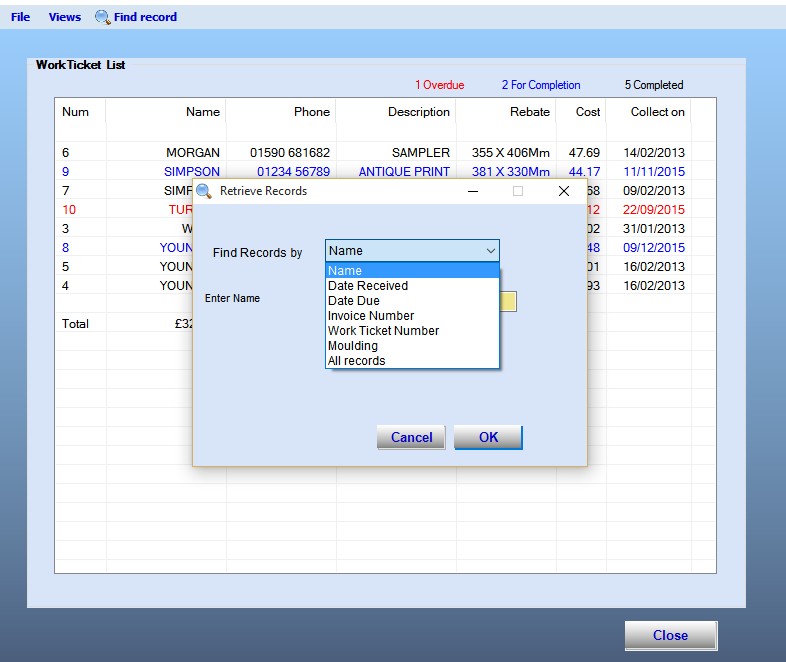
- You can bring up all of a customer's jobs by (in the WorkTicket list) selecting "Find Record" and the "Find Records by -" box initially shows "Invoice Number". Click the downward pointing arrow and select "Name".
Get into the habit of working this way and you'll notice a real difference in the way you're organized with no more customers you've "forgotten" about turning up surprising you!
Monday, 7 September 2015
Windows 10 and the Pricing Program
Windows 10 is here and lots of people are installing it (after all, it is free to most users of Windows 7, 8 & 8.1). In general it is a well worthwhile upgrade, certainly far better than 8 & 8.1. Windows 7 users well feel at home pretty much straightaway.
The Wessex Pricing Program runs just as well on Windows 10 as on the previous versions of Windows.
The only potential problem I've seen is the increased security. So, when you download something from the internet and try to open the file there are many warnings along the lines of "Files downloaded from the internet are potentially unsafe." and "Are you sure you want to continue?". In fact you might even have to explore "Additional options" in the dialogue box to run the file.
As more and more people are downloading the program from the Wessex website I hope that they won't be put off when they first go to install it.
So, for now, the procedure to try out or upgrade the program is
(NB. If you are upgrading an existing program remember to take copies of your Database and Labels/Values file (v3.mdb & user.xml) before you run the file, just in case!)
The Wessex Pricing Program runs just as well on Windows 10 as on the previous versions of Windows.
The only potential problem I've seen is the increased security. So, when you download something from the internet and try to open the file there are many warnings along the lines of "Files downloaded from the internet are potentially unsafe." and "Are you sure you want to continue?". In fact you might even have to explore "Additional options" in the dialogue box to run the file.
As more and more people are downloading the program from the Wessex website I hope that they won't be put off when they first go to install it.
So, for now, the procedure to try out or upgrade the program is
- Download the "30 Day Trail" from the Wessex website (you may need to log in with your user name and password).
- If you are at all worried, scan the downloaded file with your Anti-Virus program.
- Double-click the file to run it.
- Select "Additional Options" from the warning Dialog box.
- Click "Run Anyway".
(NB. If you are upgrading an existing program remember to take copies of your Database and Labels/Values file (v3.mdb & user.xml) before you run the file, just in case!)
Labels:
30 day trial,
download,
Window 10,
Windows
Saturday, 29 August 2015
It's not working - heeeelp!
Of course I only get to hear about problems with the pricing program (WPP4), and I use the points raised to help improve it.
Very occasionally someone finds a program error and that is easy(ish), because then it's just a question of putting things right.
Most times the problem is something like - "It was working fine 'til yesterday, but now it's giving me an error (xyz) and I can't do (abc)."
The majority of these problems are usually related to the database, most often an unexpected value has been saved and the program doesn't know what to do with it. For instance - it can't read a number that it is expecting (Someone managed to insert 2 decimal points in the same number once!) The same goes for the Labels/Values file (putting an unnecessary current symbol is a good one).
When I can track these down, I write code that checks the value, so that an incorrect one cannot be saved. In fact about 30% of the program code is made up of these error-checking routines. Below is one that checks if the Moulding ID entered is a valid one.
The generic error message of the program has 3 suggestions. (Try to continue, restart the Program, contact Wessex Pictures).
If you are getting one of these errors then -
One of the challenges of programming is that the program you write has to work on a system that can be configured in many different ways. Very occasionally I've come across a problem I just couldn't get to the bottom of. A few years ago someone found that the program worked fine, except that it wouldn't print anything, I still don't know why. In the end it was put onto different computer and the problem went away, luckily it was the only time the problem has ever arisen.
What, of course, I haven't said is that computer errors can be immensely frustrating, testing your patience to the limit. So, put that hammer away, have a cup of tea and then tackle the problem!
Very occasionally someone finds a program error and that is easy(ish), because then it's just a question of putting things right.
Most times the problem is something like - "It was working fine 'til yesterday, but now it's giving me an error (xyz) and I can't do (abc)."
The majority of these problems are usually related to the database, most often an unexpected value has been saved and the program doesn't know what to do with it. For instance - it can't read a number that it is expecting (Someone managed to insert 2 decimal points in the same number once!) The same goes for the Labels/Values file (putting an unnecessary current symbol is a good one).
When I can track these down, I write code that checks the value, so that an incorrect one cannot be saved. In fact about 30% of the program code is made up of these error-checking routines. Below is one that checks if the Moulding ID entered is a valid one.
The generic error message of the program has 3 suggestions. (Try to continue, restart the Program, contact Wessex Pictures).
If you are getting one of these errors then -
- Don't panic
- Make sure you have backed up the Database and Labels/Values file AND you have put them where they cannot get confused with similar files. (The database file is always called "V3.mdb" whether it contains your data or not)
- The error is likely to be on the record you were working on when the message appeared, so can you get to that and correct it, or at least see the problem?
- Do you have an earlier backup of the database you could import to check if the error is still there?
- If the above doesn't work can you open the Database in Microsoft Access to see the problem and correct it? (Make sure the result is saved as "V3.mdb" not "V3.accdb")
One of the challenges of programming is that the program you write has to work on a system that can be configured in many different ways. Very occasionally I've come across a problem I just couldn't get to the bottom of. A few years ago someone found that the program worked fine, except that it wouldn't print anything, I still don't know why. In the end it was put onto different computer and the problem went away, luckily it was the only time the problem has ever arisen.
What, of course, I haven't said is that computer errors can be immensely frustrating, testing your patience to the limit. So, put that hammer away, have a cup of tea and then tackle the problem!
Labels:
data types,
Editing Database,
errors,
mdb file
Saturday, 18 July 2015
Windows RT - eh?
I've often boasted that Wessex Professional will run on any variety of Windows (XPsp2 or better). Now someone has checked with me to see if it will run on Windows RT?
After a bit of head scratching and some Googling I found out that (to quote the Microsoft website) -
Windows RT 8.1 is a Windows-based operating system that's optimised for thin and light PCs that have extended battery life and are designed for life on the go. Windows RT 8.1 only runs built-in applications or apps that you download from the Windows Store.
Note that last sentence. It would seem that Microsoft have crippled functionality for battery life.
So, if someone offers you a nice Surface Pro 3 (tablet/laptop) - just say "No thank you"!
After a bit of head scratching and some Googling I found out that (to quote the Microsoft website) -
Windows RT 8.1 is a Windows-based operating system that's optimised for thin and light PCs that have extended battery life and are designed for life on the go. Windows RT 8.1 only runs built-in applications or apps that you download from the Windows Store.
Note that last sentence. It would seem that Microsoft have crippled functionality for battery life.
So, if someone offers you a nice Surface Pro 3 (tablet/laptop) - just say "No thank you"!
Sunday, 26 April 2015
Business as usual
After 2 or 3 frustrating days of trying to get the program download link to work correctly on the new Wessex Pictures website, things are now back as they should be (thanks to Martin).
It does focus on the question I'm often asked - "Whereabouts do I download the latest version of the program?"
The answer is to go to the "30 Day Trial" and download that.
When you run the install the program will recognize if you have enabled the program and will simply apply the updated files (but make sure you have made a copy of the database and user files, just-in-case!).
On the other hand if you are trying out the program then you'll be allowed to use it for 30 days from the time you run it. After that the program is disabled, BUT any the database and values/labels files are still there ready to be used when the program is enabled.
So now you know.
Subscribe to:
Posts (Atom)